> For the complete documentation index, see [llms.txt](https://docs.menanak47.com/llms.txt). Markdown versions of documentation pages are available by appending `.md` to page URLs; this page is available as [Markdown](https://docs.menanak47.com/plugins/ak47_lib/interface/objective.md).
# Objective
The Objective API is a flexible HUD component designed for the right side of the screen. It can display everything from a single line of text to complex instruction sets with multiple sections, lists, and rich text formatting.
### 🛠️ Exports
#### `ShowObjective`
Displays the objective card with specified content and positioning.
```lua
exports['ak47_lib']:ShowObjective(text, title, position)
--
Lib47.ShowObjective(text, title, position)
```
Parameters:
| **Argument** | **Type** | **Optional** | **Description** |
| ------------ | ------------ | ------------ | ------------------------------------------------------------------------------------- |
| `text` | String/Table | No | The content to display. Can be a string, a simple list, or a complex sectioned table. |
| `title` | String | Yes | The header title. Defaults to Config value. |
| `position` | String | Yes | Screen position: `'top'`, `'center'`, or `'bottom'`. |
***
#### `HideObjective`
Removes the objective card from the HUD.
```lua
exports['ak47_lib']:HideObjective()
-- or
Lib47.HideObjective()
```
***
### 🧬 Data Structures
The `text` parameter is highly versatile and handles four main types of input:
#### 1. Simple String
A single line of descriptive text.
```lua
local text = "Locate the package in the warehouse."
```
#### 2. Simple List
An array of strings rendered as a bulleted list.
```lua
local text = {
"Collect the evidence",
"Escape the police"
}
```
#### 3. Named Section
An object containing a sub-header and a list.
```lua
local text = {
Title = "Quick Menu",
List = {
"Option One 1",
"Option Two 2"
}
}
```
#### 4. Multi-Section Array
A complex array containing multiple sections or footer text.
```lua
local text = {
{ Title = "Combat", List = { "Attack 1", "Block 2" } },
{ Title = "Movement", List = { "Sprint SHIFT" } },
"Press ESC to quit" -- Footer text
}
```
***
### 💡 Examples
#### Example 1: Basic Mission Objective
Ideal for simple tracking at the top right of the screen.
```lua
exports['ak47_lib']:ShowObjective(
"Infiltrate the Humane Labs facility.",
"Current Task",
"top"
)
```
#### Example 2: Editor or Tool Controls
Using the `center` position and sections to explain controls to a player.
```lua
local controls = {
{
Title = "Zone Controls",
List = {
"Add Point 1",
"Undo Last Point 2",
"Confirm Zone ENTER",
}
},
{
Title = "Camera",
List = {
"Rotate 3",
"Move W A S D",
}
},
"Exit Editor DEL"
}
exports['ak47_lib']:ShowObjective(controls, "Editor Mode", "center")
```
#### Example 3: Dynamic Updates
You can overwrite the current objective simply by calling the export again.
```lua
-- First Objective
exports['ak47_lib']:ShowObjective("Wait for the contact...", "The Deal")
-- Update later in the script
Citizen.SetTimeout(5000, function()
exports['ak47_lib']:ShowObjective("Meet the contact at the pier.", "The Deal")
PlaySoundFrontend(-1, "Mission_Pass_Notify", "DLC_HEISTS_GENERAL_FRONTEND_SOUNDS", 0)
end)
```
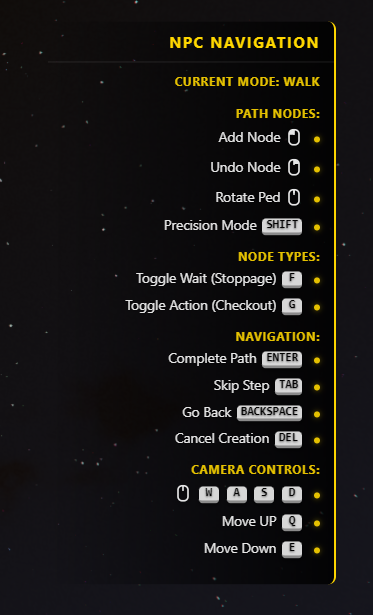
#### Example 4: Instruction With Buttons
```lua
Lib47.ShowObjective({
{
Title = "Current Mode: " .. currentMode,
List = {}
},
{
Title = "Path Nodes:",
List = {
"Add Node 1",
"Undo Node 2",
"Rotate Ped 3",
"Precision Mode SHIFT",
},
},
{
Title = "Node Types:",
List = {
"Toggle Wait (Stoppage) F",
"Toggle Action (Checkout) G",
},
},
{
Title = "Navigation:",
List = {
"Complete Path ENTER",
"Skip Step TAB",
"Go Back BACKSPACE",
"Cancel Creation DEL",
}
},
{
Title = "Camera Controls:",
List = {
" W A S D",
"Move UP Q",
"Move Down E",
},
},
}, "NPC Navigation")
```
***
### 🎨 Visual Features
* Night Mode: The card background automatically dims between 21:00 and 06:00 for better visibility.
* Rich Text: Supports the same `` (Key) and `` (Mouse) tags as the Checklist system.
* Right-Aligned: All text and list bullets are automatically aligned to the right edge of the screen.