
Tebex
Server Connection
- Navigate to Integrations > Game Servers in the Tebex Control Panel.
- Click Connect Game Server.
- Enter a server name and click Continue.
- Copy the secret key provided by Tebex.
- Add the secret key to
server.cfg:
sv_tebexSecret "YOUR_TEBEX_SECRET_KEY"- Restart the FiveM server.
- Return to Tebex Control Panel and click Continue to verify.
Package Creation
- Open package settings and click Game Server Commands.

- Select your connected server.

- Click Add Command.

- Enter the coin grant command:
on_purchase_vcoin {"transid": "{transaction}", "coin": "300"}Replace 300 with the desired coin amount.
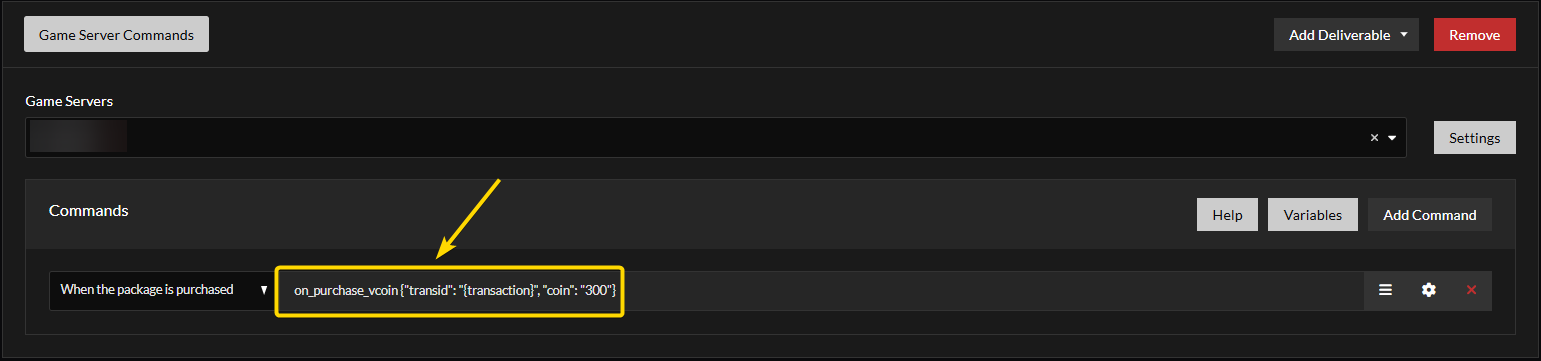
- Click the gear icon next to the command.

- Set execution trigger to Execute the command even if the player is offline.

- Save and publish package.
Notes
- Tebex transactions may take up to 10 minutes to process.
- Ensure the command execution setting permits offline execution.
On this page