> For the complete documentation index, see [llms.txt](https://docs.menanak47.com/llms.txt). Markdown versions of documentation pages are available by appending `.md` to page URLs; this page is available as [Markdown](https://docs.menanak47.com/esx/ak47_vipshop/tebex.md).
# Tebex
## **Tebex Connection**
**Step 1: Connect your server via the Tebex Control Panel**
1. Go to **Integrations > Game Servers**.
2. Click **"Connect Game Server"** (top-right).
3. Enter a recognizable **name for your server** and click **Continue**.
**Step 2: Add the secret key to your server.cfg**
Copy the **secret key** shown in the instructions and paste the following line into your `server.cfg` file:
```
sv_tebexSecret "YOUR_TEBEX_SECRET_KEY"
```
**Step 3: Restart your FiveM server**
Restart your server as you normally would via your control panel or console
**Step 4: Verify the integration**
Return to the Tebex Control Panel and press **Continue**. If successful, your server is now linked to your Tebex store.
* If the **Continue** button doesn’t activate, check your FiveM **server console for errors**, correct any issues, and try again.
* If needed, click **Skip** and return to test later.
## Create Package
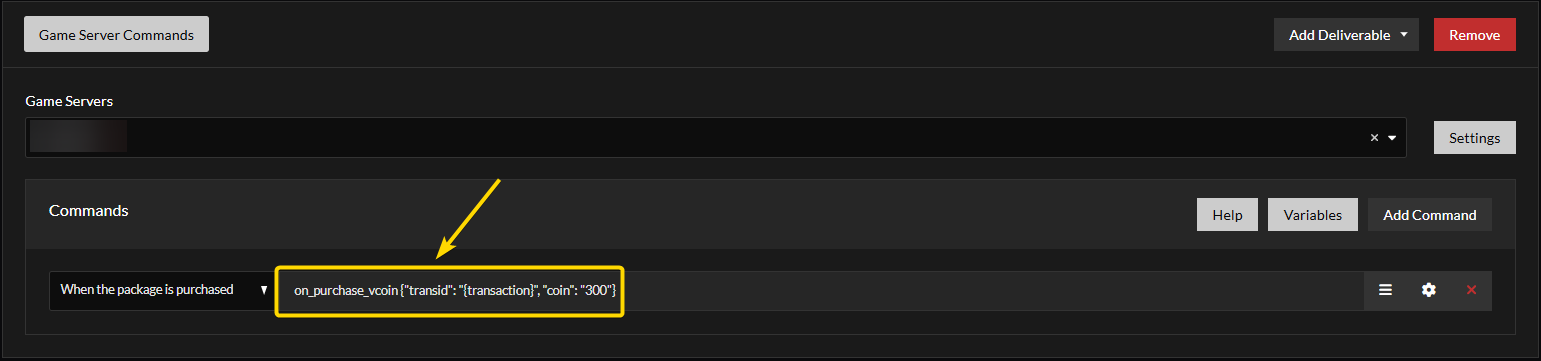
1. Click on `Game Server Commands`
2. Select your connected server
3. Click on `Add Command`
4. Copy this command and past there
```
on_purchase_vcoin {"transid": "{transaction}", "coin": "300"}
```
Here 300 is the number of coin you are giving. Set that as you need.
5. Click on the setting icon
6. In the Require Player To Be Online, set this as `Execute the command even if the player is offline`
7. Finish the package creation
### Note:
Player have to wait up-to 10 minutes after the purchase to redeem the code.